Download the World Cup 2026 Schedule PDF

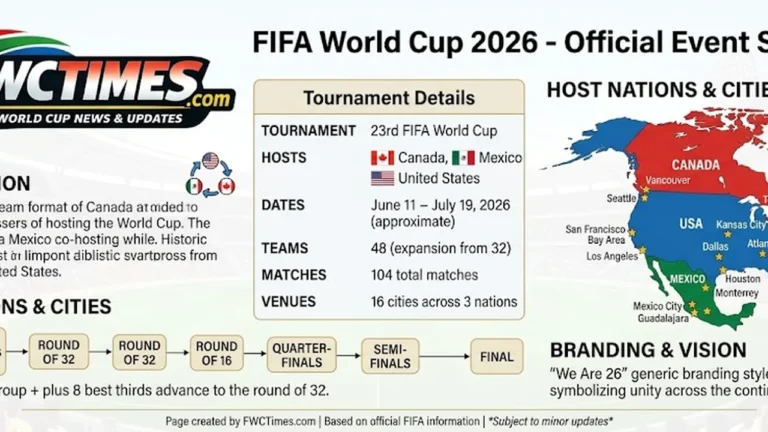
Soccer fans can download the World Cup 2026 schedule PDF to track all matches offline. The expanded tournament features forty-eight national teams competing across North America. Supporters need a reliable document to monitor kickoff times and stadium venues easily. In fact, saving a digital copy prevents you from missing crucial group fixtures.
Matches will occur in Canada, Mexico, and the United States from June 11. Fans from the USA will follow their team through the group phase. Since different cities have different time zones, planning kickoff times is important. A physical chart also helps families write down scores during the live tournament.
How to Use the World Cup 2026 Schedule PDF
A digital document allows supporters to check matchdates without using internet data. This offline access becomes very helpful when fans travel near crowded stadiums. On top of that, you can share the file with friends to plan parties. Many viewers print the chart to display the bracket path at home.
You can write the final scores directly onto your printed copy. This practice helps you track the progression of teams like Portugal. So, fans can see which nations will qualify for the next round. Supporters can monitor progress by checking the official World Cup 2026 groups online.
Steps to Save Your World Cup 2026 Schedule PDF
You must locate a trusted sports news source to download the file. Click the download button on the webpage to open the document. Because files update occasionally, you must select the latest available version. This simple download process prepares you for the opening game.
| Step | Action | Why It Matters |
|---|---|---|
| 1 | Use a trusted schedule page | Reduces the risk of outdated fixtures |
| 2 | Download the latest file | Keeps all matches in one file |
| 3 | Check timezone labels | Prevents missed kickoffs |
| 4 | Save a copy on your phone | Works during travel or poor signal |
| 5 | Recheck before matchday | Confirms teams, venues, and kickoff times |
Essential Details in a Quality Schedule
A reliable schedule must list the exact stadium for every fixture. Knowing the specific venue allows fans to organize local travel routes. Yet, the vast travel distance between host countries requires careful planning. Fans should confirm the stadium locations before booking flights.
The document should illustrate the knockout path for progressing teams. Supporters can study the tournament structure using our FIFA World Cup 2026 resources. Still, final team positions depend entirely on group stage performance. You can predict potential matches by looking at the bracket lines.
Staying Updated as the Tournament Begins
Kickoff times and venues might change before the summer opening match. As a result, you must check the official schedule regularly. Keeping a dated PDF version ensures you use the correct list. This simple routine keeps you informed about any schedule updates.
The knockout stages will feature teams from twelve distinct groups. You will write the names of qualifying nations onto your sheet. Even so, you can print a new copy when organizers finalize matchups. This interactive method keeps fans engaged throughout the event.
Frequently Asked Questions
Where can I download the official schedule?
Fans can download the document from the official FIFA platform. Many trusted sports sites also provide clean printable versions. You should select a file from a reputable online source. Since this prevents errors, you will receive the correct kickoff times.
Is the schedule subject to change?
The general dates and stadium locations remain fixed for now. Broadcasters might adjust specific kickoff times closer to the event. Yet, fans should verify their schedules before opening day. This extra step protects your travel plans from sudden shifts.
Does the schedule PDF show all matches?
The document shows all one hundred and four tournament matches. It covers the group games and the entire knockout phase. You will see empty slots for the knockout rounds initially. After all, the organizers only fill these slots after groups finish.
Can I print the downloaded schedule file?
The schedule file works perfectly with standard home printers. Many supporters display the printed chart on a wall. You can write the scores in by hand during the event. On top of that, this is a fun activity for families to enjoy.
How do I handle different time zones on the schedule?
You must check the timezone label on the downloaded PDF. Some charts list local stadium times for the games. You should convert these kickoffs to your specific region. As a result, you will never miss a kickoff on matchday.